
Download Windows 11 Final ISO Full 23H2 RTM MSDN Non TPM 2.0 Update July 2025 merupakan sistem operasi Microsoft windows terbaru yang rillis Final version di 5 Oktober 2021 lalu. Sudah sangat di nanti-nantikan untuk mencoba Sistem Operasi windows 11 terbaru ini.
dan sekarang saya coba membagikan versi Windows 11 Final MSDN ( Microsoft Developer Network ) yang artinya sudah untuk rilis publik dan di install di komputer anda dengan aman dan siap update jangka panjang.
Bagi anda yang sudah tidak sabar dan sudah menanti-nantikan Final Windows 11, bisa langsung download filenya di bawah ini dan silahkan install di komputer anda tentu dengan system Requirement yang di butuhkan harus terpenuhi.
Note: Build Windows 11 final MSDN ini adalah ver 23H2 build 22631.5624, yang sudah update July 2025, Pertama kali rillis Final, Windows 11 ini berada pada build 10.0.22000.194. di 5 Oktober yang lalu.
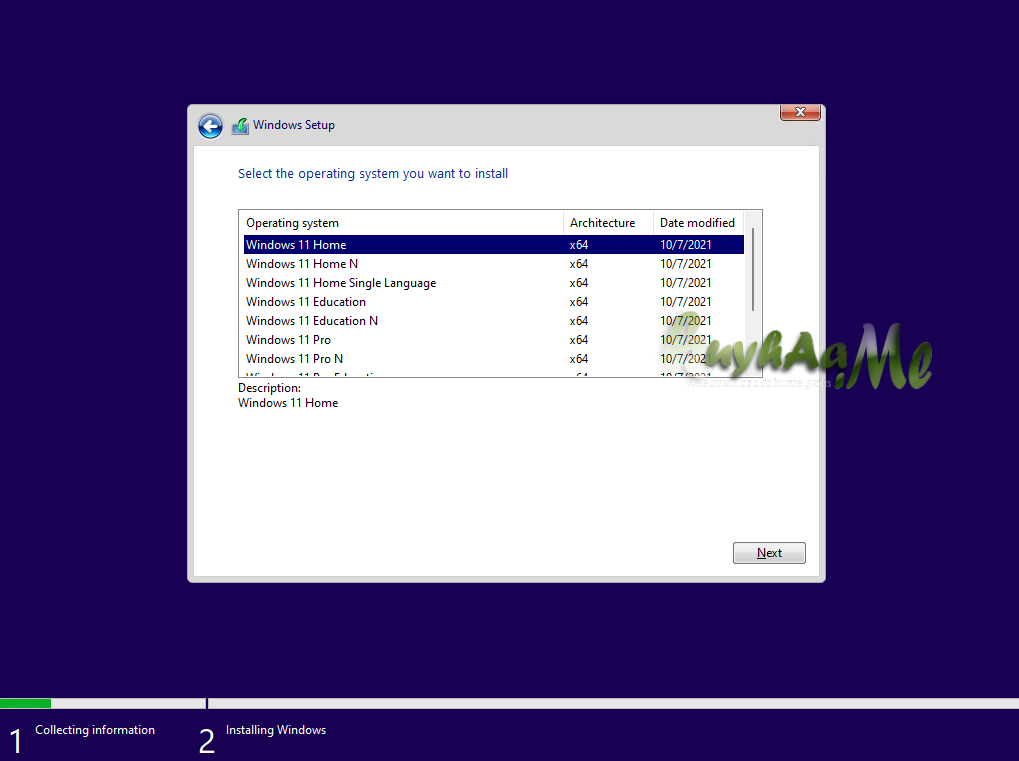


Download Windows 11 23H2 build 22631.5624 MSDN
List Of Windows
– Windows 11 Home
– Windows 11 Home N
– Windows 11 Home Single Language
– Windows 11 Education
– Windows 11 Education N
– Windows 11 Pro
– Windows 11 Pro N
– Windows 11 Pro Education
– Windows 11 Pro Education N
– Windows 11 Pro for Workstations
– Windows 11 Pro N for Workstations
Note: Versi N adalah versi tanpa Media Player pengguna Wilayah Eropa terkait kebijakan.
System requirements:
- Processor: At least two cores with a minimum clock speed of 1 gigahertz (GHz) on a compatible 64-bit processor or System on a chip (SoC).
- RAM: 4 GB or more
- Storage: 64 GB or larger storage device
- System firmware: UEFI, with secure boot support
- TPM: Trusted Platform Module (TPM) version 2.0
- Graphics adapter: Graphics adapter compatible with DirectX 12 / WDDM 2.x.
- Display: > 9 inches HD (720p)
- Internet connection: Installing Windows 11 Home requires a Microsoft account and an Internet connection.
Langkah Aktivasi
- Download kemudian silahkan burning atau buat bootable FD
=> Langkah Extract file berPart
=> Cara Burning file ISO | Cara buat bootable FD
Untuk yang download NON TPM, settingan di rufus gunakan standar TPM, hasil tetap akan NonTPM !
- Setelah itu Install ke komputer yang akan di install windows
Note: Jika di tanya serial, pilih ” I don’t have Serial ”
- Install Windows ikuti sampai selesai
- Setelah selesai install windows nya
- Silahkan aktivasi menggunakan activator di bawah ini
=> KMS Tools | AAct Activator Pilih Aact Network | Microsoft Activation Scripts | Windows Digital Activation
- enjoy full version
Note: yang Saat install langsung jadi Home, silahkan download => jadi Pro | extract, buka folder jadi pro, copy isinya dan paste ke folder Source di bootable windowsnya
atau jika tidak mau install ulang, change key di setting windows, masukan key : VK7JG-NPHTM-C97JM-9MPGT-3V66T
jika ada error abaikan, silahkan restart
- Silahkan Update Windowsnya.
- salam luar biasa
=> Cek Komputermu Support TPM mendukung Windows 11 atau tidak
New Final: Update July 2025 ! Windows 11 23H2 build 22631.5624
- byPass minta koneksi internet dan Account
- saat ada info “Let’s connect you to a network” => lihat gambar !
- tekan tombol SHIFT+F10 muncul CMD, ketik : OOBE\BYPASSNRO
- restart dan pilih “I don’t have Internet“
ver 23H2 | versi TPM | Size: 54 Gb | x64 bit | build 22631.5624
=> Windows 11 Final 23H2 TPM | via GF
=> Windows 11 Final 23H2 TPM | via MF
===================== versi ByPass NON TPM
Windows 11 Non Tanpa TPM Full
Note: versi di bawah ini Windows Installation Setup sudah saya ubah, agar bisa langsung pakai tanpa masalah dengan system requirement TPM
Versi ByPass NON TPM Agar bisa di install di komputer yg tidak support TPM, Tidak Support Processor dan Secure Boot
- byPass minta koneksi internet dan Account
- saat ada info “Let’s connect you to a network” => lihat gambar !
- tekan tombol SHIFT+F10 muncul CMD, ketik : OOBE\BYPASSNRO
- restart dan pilih “I don’t have Internet“
Update July 2025 ! build 22631.5624 Tanpa TPM ( Non Tpm )
Size: 5.3 Gb | Link download ! ver 23H2
=> Windows 11 Final 23H2 NonTPM | via GF
=> Windows 11 Final 23H2 NonTPM | via MF
yang tidak ingin clean install / Install tanpa Bootable Flashdisk ( Upgrade langsung ) => Cara Upgrade Windows 10 ke Windows 11 Mudah Tanpa TPM